
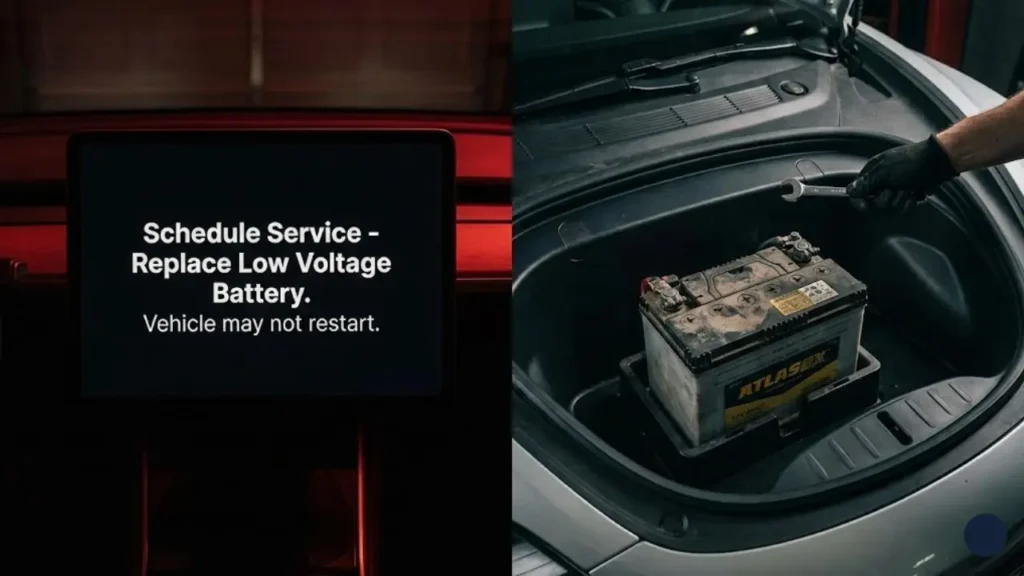
It usually happens when you first get in the car. You look at the screen and see a scary notification: “Schedule Service – Replace Low Voltage Battery. Vehicle may not restart.”
Your heart sinks. You think, “Wait, didn’t I just charge the car to 80%? Why is the battery low?”
This is one of the most common confusion points for new EV owners. The Tesla 12V battery warning is not about your main driving range. It is about the small, hidden battery that powers the brain of your car.
Before we explain the technical details, let’s answer the burning question you are frantically Googling right now.
🚗 Can I Drive With a Low Voltage Warning?
Yes, but proceed with extreme caution. You can typically drive the car for a few days (or roughly 50-100 miles) after the warning first appears. However, you should treat this as an emergency. If you park the car and the 12V battery dies completely, the car will not wake up, the doors won’t open, and you will need a tow truck. Schedule service immediately.
The “Two Batteries” Concept
To understand why this happens, you need to know that your Tesla has two hearts:
- The High Voltage (HV) Battery: This is the massive battery under the floor. It powers the wheels and the A/C. It is what you charge every night.
- The Low Voltage (12V/16V) Battery: This is a small battery (like in a gas car) hidden under the hood. It powers the touchscreen, lights, windows, audio, and—crucially—the door locks.
When the 12V battery fails, the “brain” of the car dies. The big battery might be full, but the computer can’t access it.
This is a critical safety issue. If the 12V system fails while you are outside, the electronic locks will not function. You will be physically locked out unless you know how to use the specific emergency entry methods we covered in our Tesla Door Handle & Emergency Latch Guide.
Why Did It Die? (Lead-Acid vs. Lithium)
Not all Tesla batteries are created equal. Depending on when your Model 3 or Y was built, you either have a traditional “Lead-Acid” battery (which fails often) or the newer “Lithium-Ion” auxiliary battery.
In the next section, we will help you identify which one you have and why the older ones tend to fail every 2-3 years like clockwork.
Which Battery Do You Have? (The Critical Difference)
Tesla made a massive change to the low-voltage system in late 2021/early 2022. Knowing which version you have is crucial because they are not interchangeable.
1. The Old Guard: Lead-Acid (12V)
Found in: Model S/X (pre-2021 refresh) and Model 3/Y (pre-2022).
This is a traditional AGM battery, similar to what you find in a gas car, but smaller. The problem? Teslas are “computers on wheels.” They are constantly waking up to check for updates, upload data, or run Sentry Mode.
This constant cycle of draining and charging destroys lead-acid chemistry quickly. This is why owners of older models face this warning every 2 to 3 years like clockwork.
2. The New Standard: Lithium-Ion (16V)
Found in: Model S/X (Refresh), Model 3/Y (AMD Ryzen versions, late 2021+), and Cybertruck (48V).
Tesla solved the lifespan issue by switching to a custom Lithium-Ion low-voltage battery. These are designed to last the lifetime of the vehicle (or at least 10+ years) and weigh significantly less.
Go to your car’s screen:
Tap Controls > Software > Additional Vehicle Information.
Look for “Low Voltage Battery type.” It will say either “Lead-Acid” or “Lithium-Ion.”
Symptoms of a Dying 12V Battery
Before the scary red warning pops up, your car usually gives subtle hints that the voltage is dropping. Watch out for these signs:
- USB-C ports stop charging your phone.
- Interior lights flicker or look dim.
- Software updates fail to install (the car needs a stable 12V source to update).
- Window Glitches: As the voltage fluctuates, the door modules get confused.
If you notice your windows are behaving erratically—rolling down halfway or not closing tightly—it might be an early sign of battery failure. Once you replace the battery, you will almost certainly need to recalibrate them. Save our guide on Tesla Window Calibration for when that happens.
So, you have the warning, and you have confirmed you have a Lead-Acid battery. How much will this cost to fix, and can you do it yourself? Let’s break down the costs in the next section.
The Cost: How Much to Replace a Tesla 12V Battery?
Here is the good news: Compared to a combustion engine repair, replacing the 12V battery in a Tesla is surprisingly affordable. Since there is no alternator or starter motor to worry about, you are just paying for the battery unit and minimal labor.
Here is the estimated cost breakdown (for Model 3 & Model Y Lead-Acid versions):
| Method | Estimated Cost | Time Required |
|---|---|---|
| DIY (Part Only) | $85 – $100 | 20 Minutes |
| Service Center | $120 – $140 | 1 Hour (Wait time) |
| Tesla Mobile Service | $130 – $160 | Zero (They come to you) |
For an extra $20-$30, Tesla Mobile Service will come to your driveway or office and swap the battery while you work. It is the most convenient option and ensures the correct OEM part (AtlasBX 85B24LS) is used.
Can I Replace It Myself? (DIY Guide)
Yes, swapping the 12V battery on a Model 3 or Model Y is very similar to a regular car, but you need a 10mm socket wrench.
- Open the Frunk: Remove the plastic maintenance apron (near the windshield).
- Safety First: The car needs to be powered down. On the screen, go to Controls > Safety > Power Off.
- Disconnect: Remove the negative terminal (black) first, then the positive terminal (red).
- Swap: Remove the hold-down bracket, pull out the old battery, and drop in the new one.
Warning: This involves working near high-voltage components. Before attempting this, you must read the official procedure. Refer to the Tesla Official Do-It-Yourself Guides (Select “Battery” Section).
Will I Lose My Settings?
When you disconnect the 12V battery, the computer shuts down immediately. In most cases, your driver profiles and settings are saved to the cloud/onboard memory. However, minor glitches can occur.
If you experience persistent software bugs after a battery swap, or if you are planning to sell the car soon after fixing this warning, you might need to perform a deeper system wipe. Check out our Step-by-Step Guide to Factory Resetting Your Tesla for the correct procedure.
So, the battery is fixed. But how do you prevent this from happening again too soon? In the final section, we will share tips to extend your battery life and answer common FAQs.
How to Extend Your 12V Battery Life
If you have the older Lead-Acid battery, it will fail eventually. It is chemistry. However, you can delay that day by adjusting one major setting: Sentry Mode.
Sentry Mode keeps the car’s computer awake to monitor cameras. This draws significant power from the high-voltage pack, but it also keeps the 12V system active. If you park your car for long periods (like at an airport) without plugging it in, Sentry Mode can put excessive strain on the 12V battery.
The Golden Rule: If you are parking for more than 24 hours and your car is safe, turn Sentry Mode OFF.
Frequently Asked Questions
Yes! The low-voltage battery is covered under the Basic Vehicle Limited Warranty (4 years or 50,000 miles, whichever comes first). If you get the warning within this period, open the Tesla App, schedule service, and select “Battery.” The replacement should be free ($0).
2. Can I upgrade my old Lead-Acid battery to Lithium-Ion?Officially, no. The new 16V Lithium-Ion batteries used in 2022+ models have a different voltage and physical connector. The charging system in older cars is designed for 12V Lead-Acid. However, third-party companies (like Ohmmu) sell aftermarket Lithium 12V batteries compatible with older Teslas, though they are expensive ($400+).
3. Can I jump-start a Tesla 12V battery?Yes, but only to wake up the car to open the doors or put it in “Tow Mode.” You cannot “recharge” a dead Lead-Acid battery by jumping it like a gas car. Once it fails in a Tesla, it is usually permanently dead and must be replaced.
Check your specific coverage details on the Official Tesla Vehicle Warranty Page.
Disclaimer: GreenMount Motors is an independent enthusiast blog. We are not affiliated with Tesla, Inc. Working with vehicle batteries carries risks; always follow official safety manuals.
Pingback: Tesla Windshield Washer Fluid Guide: Best Type & "Low Fluid" Fix (2026) - greenmountmotors.com
Pingback: Tesla Audio Not Working? 3 Fast Fixes for No Sound & Crackling (2026) - greenmountmotors.com
Pingback: Tesla App Stuck on "Waking Up"? 3 Fast Fixes for Spinning Wheel (2026) - greenmountmotors.com
Pingback: Tesla GPS Stuck or Frozen? 4 Ways to Fix Wrong Location (2026) - greenmountmotors.com
Pingback: 7 Common Ford Mustang Mach-E Problems (2026): "Stop Safely Now" Fix - greenmountmotors.com