
You just sat in the driver’s seat of your brand new Tesla. You put it in Drive, lift your foot off the brake, and… nothing happens. The car doesn’t move forward.
Then, you press the accelerator, gain some speed, and the moment you lift your foot, the car feels like it hit an invisible wall. It jerks back and slows down aggressively.
Welcome to the world of Tesla One-Pedal Driving. If you are coming from a traditional gas car (ICE), this sensation can feel jarring, maybe even nauseating at first. But don’t worry—your car isn’t broken. It’s just efficient.
In this guide, we will break down the Tesla stopping modes explained: Creep, Roll, and Hold. By the end of this post, you will know exactly which setting matches your driving style and why “Hold” mode might just change your life.
First: Understanding “Regen” (The Invisible Brake)
Before we touch the settings, you need to understand why the car slows down so fast. It’s called Regenerative Braking.
When you lift your foot off the accelerator, the electric motors switch roles. Instead of consuming power to spin the wheels, the spinning wheels turn the motors into generators. This creates resistance (slowing the car) and sends electricity back into the battery.
This is actually one of the biggest benefits listed in our Pros and Cons of Electric Cars guide. It saves your physical brake pads and gives you free range. However, Tesla removed the option to adjust “Regen Strength” in newer models (2024-2026). Now, the only way to customize how the car stops is via Stopping Modes.
At a Glance: The 3 Modes Compared
These settings determine what the car does when the speed drops below 5 mph (8 km/h) and you are NOT touching any pedal.
| Mode | Behavior at 0 mph | Feels Like… |
|---|---|---|
| 1. Creep | Moves forward slowly | A normal Gas Car (Automatic) |
| 2. Roll | Free rolls (like Neutral) | A Manual Transmission Car |
| 3. Hold ⭐ | Stops & Applies Brake | Pure Electric Driving |
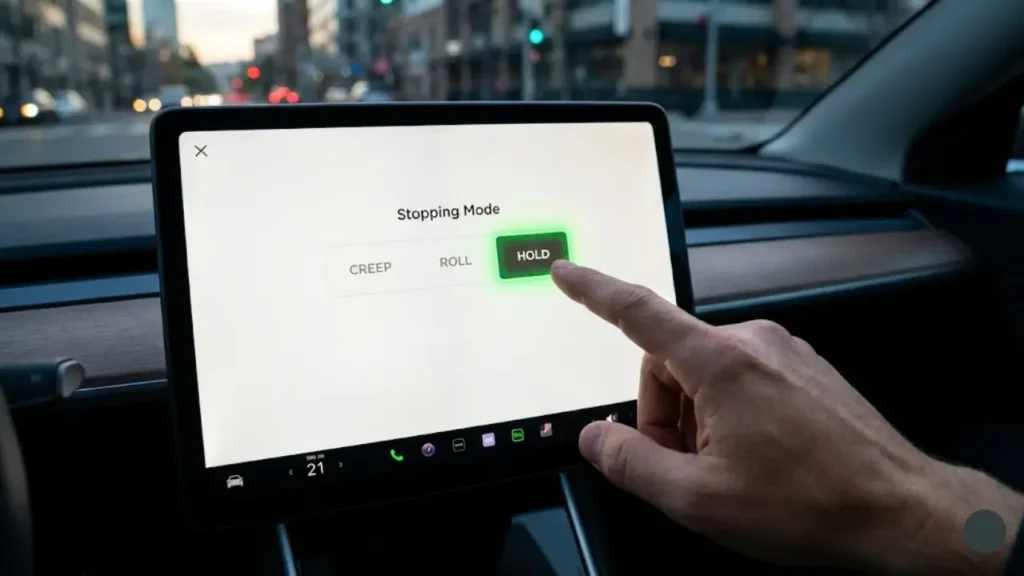
To access these settings, tap the Car Icon on your screen, go to Pedals & Steering, and look for Stopping Mode. Note: You must be in PARK to change this.
Now, let’s dive deep into each mode to see which one is right for you. We start with the most comfortable one for beginners: Creep Mode.
1. Creep Mode: The “Comfort Zone”
Best For: New EV owners transitioning from automatic gas cars.
If you select Creep, your Tesla will behave exactly like a traditional automatic transmission vehicle. When you lift your foot off the brake pedal, the motor applies a small amount of torque to slowly move the car forward (at about 3-5 mph).
Why use it?
- Muscle Memory: If you keep forgetting to press the accelerator at traffic lights, this mode saves you from embarrassment.
- Parking: Some drivers find it easier to inch into a garage spot by “riding the brake” rather than feathering the accelerator.
However, by using Creep, you are missing out on the full efficiency of the car. You still have to physically move your foot between the brake and accelerator constantly.
2. Roll Mode: The “Neutral” Feel
Best For: Drivers who prefer the feel of a manual transmission (stick shift) in neutral.
In Roll mode, when the car slows down to nearly a stop, the motor stops pushing or pulling. It simply lets physics take over. If the road is flat, you stop. If you are on a hill, gravity wins.
Unlike Hold mode, Roll mode will NOT hold the car on a hill. If you stop on an incline and take your foot off the brake, the car will roll backward. You must use the brake pedal to stay stationary.
3. Hold Mode: The “True Tesla Experience”
Best For: Everyone. (Seriously, once you get used to it, you won’t go back).
Whether you own a sedan or an SUV (check our Tesla Model 3 vs Model Y comparison to see differences), Hold Mode is the gold standard for electric driving.
This enables True One-Pedal Driving. Here is how it works:
- Regen to Zero: When you lift off the accelerator, the car slows down aggressively all the way to 0 mph.
- Auto-Brake: Once stopped, the car automatically applies the physical friction brakes.
- The “H” Icon: You will see a gray (H) icon on your screen. You can take your foot off all pedals, and the car will not move, even on a steep hill.
It reduces driver fatigue. In heavy stop-and-go traffic, you never have to touch the brake pedal. You just modulate the accelerator. It basically makes traffic jams 50% less annoying.
So, Hold mode sounds perfect, right? But what about safety in winter? Does regenerative braking cause skidding on ice? This is a huge debate.
In the next section, we will tackle the Safety Myths and explain exactly how these modes handle snow, ice, and brake lights.
The Winter Debate: Is “Hold” Mode Safe on Ice?
One of the most common questions we get is: “Will regenerative braking cause me to skid on icy roads?”
The concern is valid. In older EVs, strong regenerative braking on slippery surfaces could lock the wheels momentarily, causing a loss of traction. However, Tesla’s modern traction control system is incredibly fast—much faster than a human pumping the brakes.
For most winter conditions, Hold Mode is perfectly safe. The computer monitors wheel slip milliseconds at a time and adjusts the motor torque instantly.
If you are driving on pure black ice or deep snow where you want maximum coasting ability (to avoid upsetting the car’s balance), some veteran drivers switch to Roll Mode temporarily. This prevents the aggressive slowing sensation when you lift off the pedal.
However, the bigger issue in winter isn’t stopping—it’s range. If you want to know how cold weather affects your battery beyond just traction, read our real-world test on EV Range Loss in Winter Conditions.
The Brake Light Myth: “Am I Invisible?”
This is the number one fear of new “One-Pedal” drivers: “If I don’t touch the brake pedal, do my brake lights turn on?”
The Answer: YES.
Tesla uses an accelerometer (G-force sensor) to determine when to illuminate the brake lights. According to international safety regulations, if the car decelerates faster than a certain rate (regardless of how it happens), the brake lights must turn on.
How to Check It Yourself
Look at the car visualization on your screen while driving:
- When you lift your foot and the car slows down aggressively, look at the Tesla avatar on your screen.
- You will see the brake lights on the digital car glow red.
- This confirms that the actual lights on the back of your car are also on, warning the driver behind you.
Which Mode Should You Choose?
If you are still undecided, here is our final verdict based on 10,000 miles of testing:
- Day 1 to Day 3: Use Creep Mode if you are nervous. It acts like a safety blanket while you get used to the car’s size and screen.
- Day 4 Onwards: Switch to Hold Mode and force yourself to use it for one week. By the end of the week, your brain will rewire, and driving a gas car will feel surprisingly outdated and “runaway.”
Ready to make the switch? In the final section, we will answer some frequently asked questions about battery health and changing settings while driving.
Frequently Asked Questions
Absolutely not. In fact, it is healthy for the battery. Short bursts of charging while slowing down help keep the pack warm in winter and extend your total driving range by 15-20%.
2. Can I change Stopping Modes while driving?No. For safety reasons, the “Stopping Mode” menu is grayed out while the car is in motion. You must bring the vehicle to a complete stop and put it in PARK (P) to switch between Creep, Roll, and Hold.
3. Why is my regenerative braking limited?If you see a warning that “Regenerative Braking is Limited,” it usually means your battery is either 100% charged (no room for energy) or too cold. Once the battery warms up or drops below 95%, full braking power will return.
4. Does Autopilot use my stopping mode?No. When Autopilot or FSD is active, the computer takes full control of braking logic. Your personal setting (Creep/Roll/Hold) only applies when you are driving manually.
For more technical details on motor behavior, refer to the official Tesla Owner’s Manual: Stopping Modes.
Final Verdict: Embrace the Future
Switching to Hold Mode requires a mental shift. For the first two days, you might stop too early or jerk your passengers around. But give it time.
Once you master “One-Pedal Driving,” returning to a gas car feels like stepping back in time. You will wonder why you ever tolerated the chore of constantly moving your foot to the brake pedal in traffic. It is not just a feature; it is a better way to drive.