
It is a hot summer day. You need to run into the grocery store for “just 5 minutes.” You have your dog in the back seat. In a traditional gas car, you have two bad options: leave the engine running (easy to steal) or crack the windows (dangerous and ineffective).
Worse, a concerned passerby might see your panting dog, panic, and smash your window to “save” them. This happens thousands of times a year.
Enter Tesla Dog Mode. This feature is not just about climate control; it is a communication tool designed to keep your pet safe and your windows intact.
In this ultimate Tesla Dog Mode guide, we will explain how to use it, why it sometimes fails (and how to prevent it), and answer the burning question: Is it actually safe?
What is Tesla Dog Mode?
Released via an Over-the-Air (OTA) update in 2019 after a Twitter request to Elon Musk, Dog Mode is a specialized climate setting that does two critical things simultaneously:
- Maintains Cabin Temperature: It keeps the HVAC system running to maintain a set temperature (e.g., 68°F/20°C) even after you lock the car and walk away.
- Displays a Safety Message: It turns the massive center screen into a billboard to inform outsiders that the pet is safe.
The “Figure” on the Screen: Why It Matters
Many new owners ask about the tesla dog mode figure displayed on the screen. Why is it there?
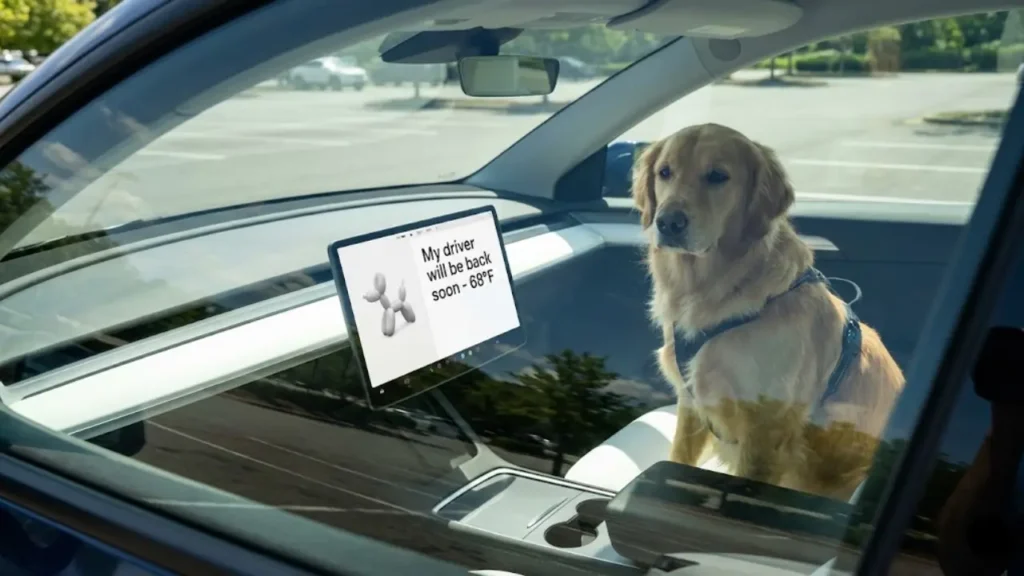
When you engage this mode, the standard map and menu disappear. Instead, a large, animated graphic of a balloon dog (or a realistic dog in newer updates) appears on a white background with massive text that reads:
“My driver will be back soon.”
68°F
Don’t worry, the heater is on.
This visibility is crucial. It stops well-meaning strangers or police officers from breaking your glass. The large font ensures the temperature is readable even through tinted windows.
Important Note on Air Quality
Since Dog Mode keeps the AC compressor running for extended periods while the car is stationary, it circulates a lot of air. If you notice a funky smell when you return to your car, your filters might be dirty.
A musty odor can make your pet uncomfortable. If you experience this, check our guide on the Tesla AC Vinegar Smell Fix to ensure your furry friend is breathing clean, fresh air.
So, the feature sounds perfect, right? But what if you come back and find the car is hot? Or what if the mode refuses to turn on? In the next section, we will cover the Setup Guide and the critical “20% Battery Rule” that catches many owners off guard.
How to Enable Dog Mode (The Right Way)
Turning on this feature is simple, but it must be done after you park. You cannot enable it while driving.
- Park your Tesla and keep your foot on the brake.
- Tap the Fan Icon (Climate Control menu) at the bottom of the screen.
- On the top right of the menu, look for the icons: Keep, Dog, and Camp.
- Select “Dog”.
- Exit the car and lock the door. The screen will now display the safety message and current cabin temperature.
Fun Fact: You can also use a voice command. Just say “Turn on Dog Mode” or, for Rick and Morty fans, say “Keep Summer Safe,” and the car will activate it automatically!
The “20% Rule”: Why Dog Mode Fails
This is the most critical section of this guide. We see search queries like “Tesla dog mode failure” or “Tesla dog mode malfunction” constantly. In 90% of cases, the system isn’t broken—it’s a safety limit.
Tesla Dog Mode will NOT activate if your battery is below 20% state of charge.
Even worse, if you leave your dog in the car at 25% battery and it drains down to 20% while you are shopping, Dog Mode will shut off to save power for driving. You will receive a frantic push notification on your phone: “Problem with Climate Keeper. Please return to your vehicle immediately.”
The Sentry Mode Conflict
Another common reason for Tesla dog mode not working is the conflict with the car’s security system. Users often ask: “Can I have Sentry Mode ON while Dog Mode is ON?”
The answer is No—and for good reason.
If Sentry Mode were active, your dog moving around inside the car would trigger the intrusion alarm, blasting loud music and potentially traumatizing your pet. Therefore, when you enable Dog Mode, the car automatically silences the internal security sensors.
However, the external cameras still record. To understand how the cameras work independently of the alarm, read our detailed Tesla Sentry Mode Guide. This ensures you know exactly which security features are active while your pet is inside.
Now that you know how to turn it on safely, what happens if the screen goes black? Or what if you want to see your dog while you are in the store? In the next section, we will cover “Live Camera Monitoring” and troubleshoot common glitches.
Peace of Mind: How to Watch Your Pet Live
The anxiety of leaving a pet behind is real. “Is he barking?” “Is he sleeping?” “Did he chew the seatbelt?”
Fortunately, Tesla allows you to check on your pet in real-time using the internal cabin camera. This feature turns your car into a remote pet monitor.
1. Open the Tesla App.
2. Go to Security > Sentry Mode > View Live Camera.
3. Select the “Interior” dot to switch to the cabin view.
Note: You need “Premium Connectivity” ($10/mo) for this to work over LTE, unless the car is connected to Wi-Fi.
Troubleshooting: “Tesla Dog Mode Not Working”
Aside from low battery, there are other reasons why you might face a Tesla dog mode malfunction or find the option grayed out.
1. The “Open Window” Glitch
The system is designed to be a closed loop. If you manually cracked a window open for “fresh air” before trying to engage Dog Mode, the system might refuse to activate or behave erratically. Trust the car’s HVAC system; keep all windows fully closed for the sensors to work correctly.
2. Firmware Bugs
Like any computer, Tesla software can have bugs. Occasionally, after a new update, the Climate Keeper features might glitch. If the button is unresponsive, try performing a “Soft Reset” (hold both scroll wheels on the steering wheel until the screen restarts) before leaving the car.
Real Concern: Battery Drain Per Hour
A common search query is “Tesla dog mode battery drain”. Will you come back to a dead car?
On an average day (70°F – 80°F), Dog Mode is incredibly efficient, using about 1-2% battery per hour. However, physics takes over in extreme weather.
If it is freezing outside (10°F) or scorching hot (100°F), the heat pump has to work much harder. We have documented how climate control impacts energy consumption in our Real World EV Winter Range Test. In extreme conditions, expect usage to jump to 3-4% per hour. Always buffer your charging accordingly.
Now that we have covered the tech, let’s talk about the law. Even if your car is cool, can a police officer still legally break your window? The answer is complicated.
In the final section, we will discuss the Legal Myths and provide a final safety checklist.
Is It Legal? (The “Broken Window” Myth)
This is the grey area. Laws regarding leaving pets in cars vary by state and country. Generally, the law prohibits “endangering an animal” by leaving them in extreme heat.
Since Tesla Dog Mode actively keeps the cabin cool (e.g., 68°F), you are technically not endangering the animal. The massive screen message is your legal defense—it proves to any bystander or police officer that the environment is safe.
However, a warning: Not every police officer knows what a Tesla is. If the sun glare covers your screen, or if the officer believes the dog looks distressed regardless of the sign, they still have the authority to break the window to “rescue” the animal. Always park in the shade if possible to make the screen visibility better.
For more on pet safety in hot weather, refer to the ASPCA’s Hot Weather Safety Tips.
Frequently Asked Questions
ABSOLUTELY NOT. It is illegal in almost every jurisdiction to leave a child unattended in a vehicle, regardless of the temperature. Do not use this feature for humans.
2. What is the difference between Dog Mode and Camp Mode?Dog Mode locks the doors from the inside (so the dog can’t accidentally open them) and turns off the alarm. Camp Mode keeps the USB ports powered (for charging phones) and allows the car to be unlocked from the inside. Never use Camp Mode for pets, as they might trigger the window switches.
3. How long can Dog Mode run?It can run as long as your battery is above 20%. With a full charge, a Tesla can technically maintain cabin temperature for days. However, for the pet’s comfort (water/bathroom needs), we recommend limiting it to short trips.
Disclaimer: GreenMount Motors is an independent guide. We are not legal advisors. Always check your local state laws regarding leaving pets in unattended vehicles.
Pingback: How to Clean Tesla White Seats: Jeans Stain Removal & Safe Products (2026) - greenmountmotors.com