
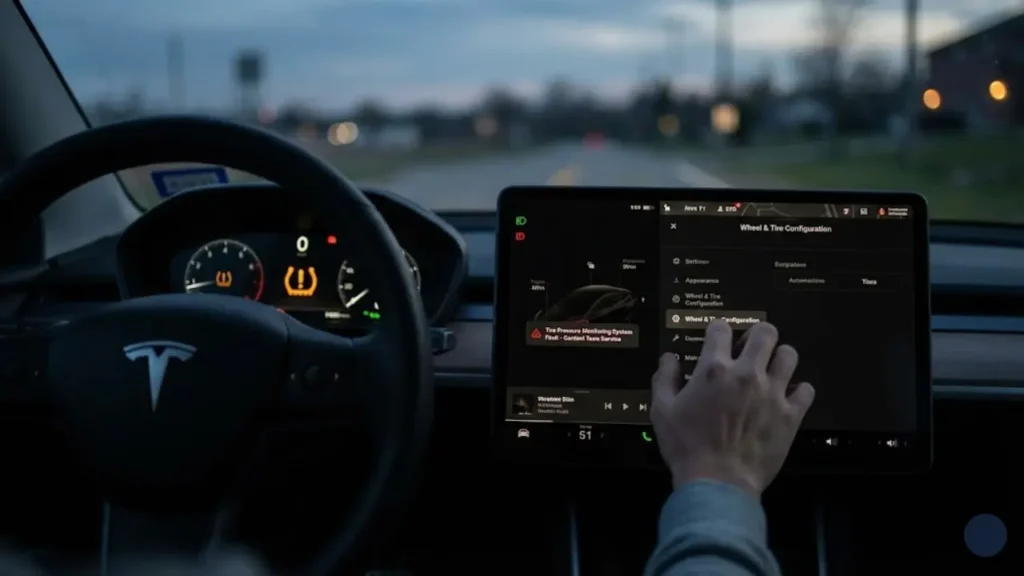
You are driving down the highway, enjoying the silence of your EV, when suddenly a loud chime interrupts your peace. A yellow icon shaped like a horseshoe with an exclamation mark appears on your dashboard. Your heart skips a beat. Is it a flat tire? Do you need to pull over immediately?
Before you panic and call roadside assistance, you need to understand what the car is trying to tell you. The Tesla Tire Pressure Monitoring System (TPMS) is smart, but it can be confusing. The error you see might not be about the air in your tires at all—it might just be a computer glitch.
In this guide, we will troubleshoot the dreaded Tesla tire pressure monitoring system fault, explain why the light is blinking, and show you how to reset it without visiting a Service Center.
Watch the yellow tire icon carefully when you first start the car:
1. Solid Light (Stays On): This means Low Tire Pressure. One or more tires are below 42 PSI (or your set limit). Fill them with air.
2. Blinking Light (Flashes for 1 min, then Solid): This indicates a System Fault. The car cannot talk to the sensors. Filling air WILL NOT fix this. The sensor is broken, missing, or disconnected.
What Does “Tire Pressure System Fault” Mean?
If your screen explicitly displays the message “Tire Pressure Monitoring System Fault”, it means the TPMS receiver in the car has stopped receiving data from one or more wheels.
Common causes for this error include:
- Sensor Battery Death: TPMS sensors have internal batteries that last 5-7 years. If you drive an older Model S or Model 3, a sensor might have simply died.
- Aftermarket Wheels: Did you recently change your tires? Non-Tesla sensors often fail to communicate with the car’s Bluetooth (BLE) system.
- Signal Interference: Believe it or not, cheap USB chargers or dashcams plugged into the 12V socket can interfere with the radio frequency (RF) of older sensors.
The “Cold Weather” Fake Alert
Every winter, Tesla forums are flooded with posts about the Tesla cold weather tire pressure alert. This is simple physics, not a fault.
For every 10°F (6°C) drop in outside temperature, your tire pressure drops by roughly 1 PSI. If you filled your tires to 42 PSI in summer, a freezing winter morning could drop them to 38 PSI, triggering the alert. Solution: Add air to reach 42 PSI while the tires are cold.
If you have verified the air pressure with a manual gauge and it is correct (42 PSI), but the Tesla tire pressure light blinking persists, you have a software glitch. In the next section, we will show you the “Hidden Reset Trick” involving the Wheel Configuration menu.
How to Reset the TPMS System (The “Missing” Button)
If you search Google for Tesla tire pressure monitoring system fault reset, you will find old guides telling you to press a “Reset Sensors” button in the Service menu. If you own a Model 3, Model Y, or a newer Model S/X, you have probably noticed that this button does not exist.
Newer Teslas use automatic learning. But what happens when the “Automatic” part fails? You have to force it. Here is the technician’s trick to force a system reboot.
1. The “Wheel Config” Swap (The Magic Fix)
This is the most effective way to clear a Tesla Model Y tire pressure sensor fault without tools. By telling the car you changed wheels, you force the ECU to delete old sensor IDs and scan for new ones.
- Park the car. Go to Controls > Service > Wheel & Tire Configuration.
- Change your wheel size to anything different (e.g., if you have 19″ Gemini, select 20″ Induction).
- Tap Confirm. The car will reboot (screen goes black).
- Wait for it to restart. Now, go back and change it BACK to your correct wheel size.
- Tap Confirm again.
Why this works: This toggle flushes the TPMS cache memory, often clearing the “System Fault” error instantly.
2. The “Drive to Calibrate” Rule
Unlike older cars, Tesla sensors do not transmit data when parked (to save battery). They only wake up when they spin.
If you just filled air or performed the reset above, the light won’t turn off immediately while parked. You must drive:
- Speed: Above 15 mph (25 km/h).
- Duration: At least 10 to 15 minutes continuously.
3. The Hard Reboot
If the Wheel Config trick didn’t work, the entire vehicle controller might be frozen. As we discussed in our Tesla Black Screen Restart Guide, a scroll-wheel reset can sometimes fix hardware communication glitches.
Perform a standard two-button restart and then go for a drive. If the light is still blinking after all this, you likely have a hardware failure. But before you buy a new sensor, you must know which type to buy, because Tesla changed the technology in 2021.
Hardware Failure: Did You Buy the Wrong Sensor?
If the resets didn’t work, you likely have a dead sensor. But before you order a replacement online, you must identify your system. In 2021, Tesla made a massive change that confused everyone.
The biggest mistake owners make is buying cheap generic sensors for a new Tesla. They will not work. Here is the definitive guide to Tesla Bluetooth tire pressure sensors vs RF sensors.
Understanding Tesla TPMS Sensor Battery Life
A common question is: “Can I just change the battery inside the sensor?”
Unfortunately, no. The sensors are sealed units designed to withstand extreme centrifugal force and weather. The typical Tesla TPMS sensor battery life is roughly 5 to 7 years or about 80,000 to 100,000 miles.
If one sensor dies due to low battery, the others are likely close to death too. It is often smarter (and cheaper in labor) to replace all four when you get new tires.
💰 Tesla Tire Pressure Sensor Replacement Cost
The price depends heavily on which technology your car uses:
- Official Tesla Service: Expect to pay around $95 per sensor (BLE) + labor. Total job: ~$500.
- Aftermarket (RF): $35 – $50 per sensor at tire shops.
- Aftermarket (Bluetooth/BLE): More expensive, usually $60 – $80 per sensor.
Now that you know which hardware you have, what about the environment? Why does the light come on every time the temperature drops? In the final section, we will explain the “Winter Logic” and answer common FAQs.
The Winter Factor: Why Your Tesla Hates the Cold
If you live in a cold climate, the Tesla cold weather tire pressure alert is almost an annual tradition. But why does it happen even if you have no leaks?
It is basic physics. As air gets colder, it contracts and takes up less space, lowering the pressure (PSI). For every 10°F drop in temperature, you lose about 1 PSI.
Just as cold weather saps your tire pressure, it also reduces your battery range. If you are noticing efficiency issues along with your tire alerts, check our guide on Tesla Phantom Drain & Winter Battery Tips to protect your range.
Should You Use Nitrogen Instead of Air?
Tire shops often upsell Nitrogen fills ($40-$80) claiming it prevents pressure loss. Is it worth it for a Tesla?
- The Theory: Nitrogen molecules are larger than oxygen, so they leak out slower. Nitrogen is also less affected by temperature changes.
- The Verdict: Unless you are racing on a track, save your money. Regular air is already 78% Nitrogen. The difference in daily driving is negligible. Just buy a $30 portable air compressor instead.
Frequently Asked Questions
On newer Teslas (Bluetooth sensors), the system auto-learns the new tire positions after driving for 10 minutes above 15 mph. No manual reset is needed. On older models, you may need to press “Reset Sensors” in the Service menu.
2. Can I drive with the TPMS light on?If the light is solid, check your pressure immediately; driving on a flat tire destroys the sidewall. If the light is blinking (System Fault), it is safe to drive, but you won’t get warnings if you actually get a flat.
3. Where can I see the exact tire pressure numbers?Model 3/Y: Swipe left on the car status card (bottom left of screen) under the visualization.
Model S/X: View it in the instrument cluster menu using the scroll wheels.
Pingback: Tesla Curb Rash Repair: DIY Fix for Under $50 vs. Professional Cost (2026) - greenmountmotors.com