
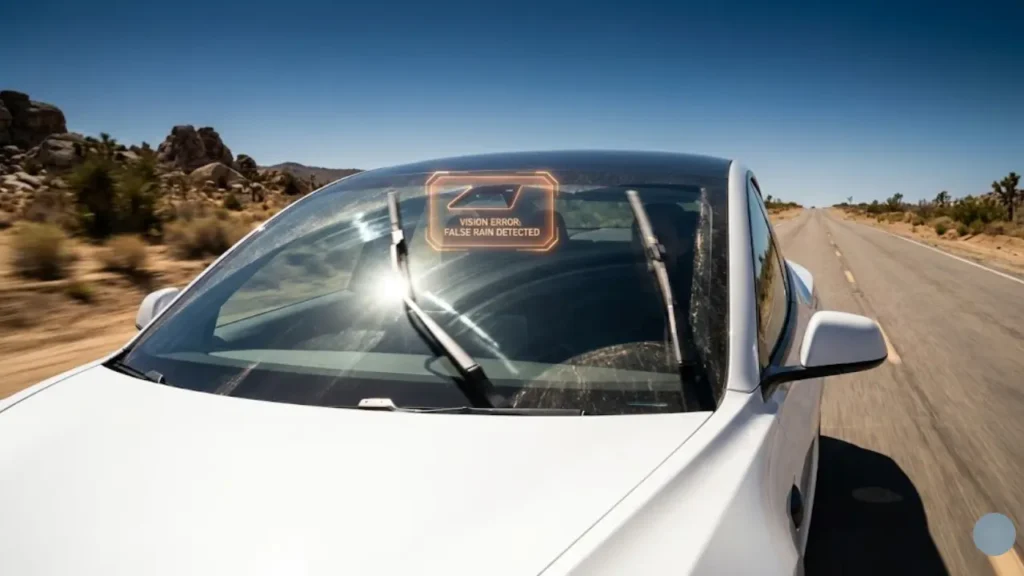
It is a perfect, sunny afternoon. You are cruising down the highway in your Model Y or Model 3, enjoying the silence. Suddenly—SCREECH!
Your windshield wipers activate at full speed, dragging aggressively across the dry glass. You look around in confusion. Is it raining? No. Is there a bird? No. It is just your car fighting invisible ghosts.
If you have Googled “Tesla windshield wipers turn on randomly,” you are not alone. This phenomenon, known as “Phantom Wiping,” is one of the most frustrating quirks of Tesla ownership.
Tesla wipers rely on cameras, not rain sensors. The “Phantom Wipe” is usually caused by:
- Dirty Camera Housing: A dead bug, sap, or oil smear directly in front of the top-center camera.
- Sun Glare: Sudden bright light hitting the camera lens.
- Old Wiper Blades: Streaks left by old blades confuse the AI.
👉 The Fix: Deep clean the windshield camera area with isopropyl alcohol (detailed steps below).
The Danger of “Dry Wiping”
This isn’t just an annoyance; it is a hardware risk. When wipers drag across a dry, dusty windshield, they act like sandpaper.
Ignoring phantom wipers can lead to permanent glass micro-scratches (hazing) and premature burnout of the wiper motor. Plus, it ruins your expensive wiper blades in weeks rather than months.
The Science: Why Tesla Wipers Are Different
To fix the issue, you must understand the technology. In 99% of other cars, automatic wipers use a cheap Infrared Rain Sensor glued behind the mirror. It detects light refraction from water droplets. It’s simple, and it works.
Tesla does not use rain sensors.
Instead, your car relies on the Tesla Vision system. The three forward-facing cameras (located in the black housing at the top of your windshield) feed video to the car’s computer.
Meet “Deep Rain”
Tesla’s neural network, internally codenamed “Deep Rain,” analyzes every frame of video to visually detect rain. It looks for splashes, wet roads, or droplets.
The Glitch: Because it relies on eyes (cameras) rather than touch (sensors), the system gets tricked by optical illusions. Common triggers include:
- Dried Bug Guts: A translucent bug splatter looks exactly like a water droplet to the camera.
- Shadows: Driving through a tunnel or under flickering trees.
- Glass Coatings: Water repellents that create “sparkly” beads of water.
Fix #1: The “Camera Housing” Deep Clean
Since the problem is usually visual, the solution is to clear the obstruction. However, simply wiping the whole windshield with a gas station squeegee won’t cut it.
You need to focus on the Camera Housing located at the top center of the windshield, right behind the rearview mirror. This trapezoid-shaped area is the “eye” of your car.
If there is a smear of grease, tree sap, or a translucent bug splat directly in front of these lenses, the autopilot computer thinks it is looking at rain.
The Pro Cleaning Method:
- Inspect the Area: Stand outside and look closely at the glass in front of the rearview mirror. Use your phone flashlight to spot faint smears.
- Use Isopropyl Alcohol: Standard glass cleaners often leave a waxy residue. Use a 70% Isopropyl Alcohol wipe to cut through road grease and oil.
- The Clay Bar Trick: If the glass feels rough to the touch (embedded contaminants), use an automotive clay bar. This removes invisible grit that confuses the sensors.
Be careful with high-pressure sprays near the cameras. To clean your sensors safely without triggering alarms or damage, make sure you understand the correct settings. Read our guide on How to Use Tesla Car Wash Mode Correctly.
Fix #2: The “Water Repellent” Trap
Many owners love products like Rain-X or ceramic coatings to make water bead up. While great for human visibility, these products can actually cause Tesla wipers to go crazy in the sun.
Why avoid them on the camera area?
- Wiper Chatter: Coatings increase friction, causing the blades to skip or “chatter” loudly across the glass.
- Visual Noise: The tiny beads of water created by these coatings refract sunlight differently than a flat sheet of water. This “sparkle” effect can confuse the Tesla Vision cameras into thinking it is raining when it is just glare.
The Fix: If you have applied a coating, use a glass polishing compound (like Cerium Oxide) to strip the coating specifically from the camera housing area.
For official guidance on what cleaners are safe, refer to the Tesla Owner’s Manual: Cleaning Cameras & Sensors.
Fix #3: The “Soft Reset” (Software Glitch)
Sometimes, the issue isn’t dirt or rain—it’s just the computer having a bad day. Like any laptop or smartphone, the Tesla Vision system can get confused or “stuck” in a logic loop where it thinks it is raining when it isn’t.
If your wipers are going manic on a sunny day and cleaning the glass didn’t help, try a standard reboot.
How to do it: Hold down both scroll wheels on the steering wheel until the screen goes black. This reboots the infotainment and resets the sensor calibration. For a detailed walkthrough on when and how to reboot safely while driving, check our guide on How to Reset Your Tesla Screen & Computer.
The “Autopilot” Dilemma: Why Can’t I Turn Them Off?
This is the #1 complaint from owners. You engage Autopilot (or FSD), the sun is shining, and the wipers start dry-wiping. You try to turn them off on the screen, but the “Off” button is greyed out or switches back to “Auto” instantly.
Why does this happen?
When Autopilot is active, the car takes responsibility for your safety. It relies 100% on the cameras to see lane markings and traffic. If the computer detects anything on the windshield (dust, glare, bug guts) that compromises its vision, it forces the wipers on to clear it.
The Workaround (2026 Update):
While you cannot permanently disable auto wipers in Autopilot mode (due to safety liability), you can manage the annoyance:
- Disengage Autopilot: The moment you switch back to manual driving, you regain full control of the wipers.
- The “Single Press” Trick: Press the button on the end of the left stalk once. This brings up the wiper card on the screen. From there, you can quickly adjust the speed manually (e.g., set it to “I” or “II” instead of “Auto” to stop the frantic wiping), though it may default back to Auto shortly after.
The Voice Command Trick
Fumbling through touchscreen menus while driving is dangerous. The fastest way to tame your wipers is to yell at your car (politely).
Press the right scroll wheel and say:
- “Set wipers to Off”
- “Set wipers to Speed 1”
- “Turn on wipers”
Note: If Autopilot is active, the system may reject the “Off” command for safety reasons, but setting it to a specific low speed often works better than “Auto”.
Is This a Defect? (The Final Verdict)
So, is your car broken? No. The phantom wiper issue is a known characteristic (some say “quirk”) of the Tesla Vision system.
While Tesla engineers are constantly improving the “Deep Rain” neural network via over-the-air updates, the system is still more sensitive to dirt and glare than a traditional infrared sensor found in other cars.
This wiper glitch is just one of several unique traits of owning a Tesla. If you are new to the ecosystem and want to know what else to watch out for (like door handle freezes or paint issues), check out our comprehensive guide on Tesla Model 3 Common Problems & Reliability (2026).
The Golden Rule: Keep that top center windshield area spotless. A clean camera means a smarter car.
Frequently Asked Questions
Why do my Tesla wipers turn on when it’s sunny?
This is called “Phantom Wiping.” It happens because Tesla uses cameras instead of rain sensors. The cameras often mistake bug splatters, dust, or glare from the sun for raindrops, triggering the wipers to clear the “obstruction.”
How do I turn off auto wipers on Tesla Autopilot?
Currently, you cannot fully disable auto wipers while Autopilot or FSD is active. Tesla enforces this for safety reasons to ensure the cameras have a clear view. However, you can manually press the wiper button on the stalk to temporarily adjust the speed.
Can I use Rain-X on my Tesla windshield?
It is recommended to avoid applying water repellents like Rain-X specifically over the camera housing area (top center). These coatings can cause wiper chatter and create visual noise that confuses the autopilot cameras.
⚠️ Disclaimer:
The information provided in this guide is for educational purposes only. GreenMountMotors is not affiliated with Tesla, Inc.
While we strive to provide accurate troubleshooting steps, we are not certified mechanics. Cleaning vehicle sensors, using chemical cleaners, or adjusting settings while driving is done at your own risk. Always prioritize safety and consult the official Tesla Owner’s Manual or a certified service center for persistent issues.